Penalty Shootout Game Online: Spot Kicks and Saves
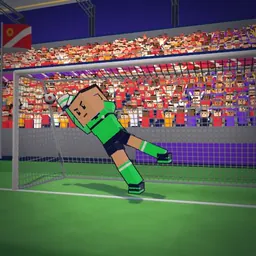
Penalty Kicks puts you directly on the spot in a packed three-dimensional football stadium, challenging you both as a clinical striker and a quick-reacting goalkeeper. You can jump straight into the action free in your browser on mobile, tablet, or desktop with no downloads required. Every duel tests your accuracy, curve, and timing against computer opponents determined to keep the net empty.
Whether you want a quick five-kick decider or a full championship campaign, this football penalty game delivers responsive 3D ball physics and rapid gameplay. This guide explains the shooting and saving controls, tournament structures across three difficulty tiers, and practical penalty taking tips to help you build a high streak record.
What Is Penalty Kicks?
Penalty Kicks is a 3D penalty shootout game online where you contest decisive spot-kick battles inside an enclosed stadium. The setup features a regulation goal, a football positioned on the penalty mark, and two active positions: the striker attempting to beat the reach of the keeper, and the goalkeeper defending the goal line between the posts.
Unlike full-pitch matches, the focus remains entirely on the tense duel between shooter and stopper. You trade roles back and forth with a computer opponent, taking a strike to score and then donning the gloves to dive across the frame and deflect your rival's incoming effort.
How to Play Step by Step
Stepping up to the spot requires a balance between power, placement, and defensive anticipation. Follow these steps to complete a round:
- Step up to the ball at the penalty spot and assess the goal.
- To take a shot on a touchscreen or mouse, swipe or drag forward from the ball toward the net; where the swipe ends is your target.
- Set your shot power through the length of your swipe, extending a longer drag for higher pace.
- Bend the ball by drawing a curved swipe, arcing the ball around obstacles and past the goalkeeper's reach.
- On a computer keyboard, aim using the arrow keys and shoot by pressing the Space bar.
- Switch immediately to goalkeeper duty for your opponent's turn.
- Tap the spot you want to dive to, or use the arrow keys and Space bar on a keyboard. Wait for the strike, as diving too early lets the striker change sides.
- Take five kicks each; if the score remains tied after five attempts per side, the shootout enters sudden death.
Scoring Rules and Winning Conditions
A standard shootout gives each side five kicks from the penalty spot. The winner is the team with the most goals after both five-shot sequences are complete.
If the score remains level after five attempts each, the contest moves into sudden death. In sudden death, teams continue taking kicks in paired rounds until one side scores and the other misses.
Beyond single matches, Tournament mode arranges eight invented teams into a single-elimination cup bracket. You must win your quarter-final, semi-final, and final across Easy, Normal, or Hard difficulty to lift the trophy. Streak mode tracks your longest uninterrupted run of converted penalties, while Training mode measures your skill across 36 individual target-practice challenges with walls and wind.
Penalty Taking Tips and Goalkeeping Strategy
Converting penalties consistently against disciplined computer keepers requires thoughtful execution rather than wild power. Use these proven penalty taking tips to improve your conversion rate and keep clean sheets:
- Aim inside the posts, not at them: Shots close to the corners are the hardest to save, but too much power sends them wide or over the crossbar.
- Mix up your corners: On Hard difficulty, rival strikers and keepers start reading your habits, so avoid targeting the same spot repeatedly.
- Wait for the strike before you dive: As the keeper, a late dive to the correct side beats an early guess. Tapping too early allows the striker to change sides.
- Bend shots around defensive walls: In training levels featuring walls, draw a curved swipe so the ball arcs laterally past the barrier before dipping into the goal.
- Compensate for wind: In windy training levels, aim slightly against the direction the wind blows to keep the ball on target.
- Prioritize consistency during streak runs: Your best run of goals is saved in Streak mode, so a steady, safe shot often beats a risky top corner.
- Treat shot arcs with the same calm release you would use in precision aiming games like Darts vs AI or Hoop Hero.
Common Beginner Mistakes to Avoid
New players often drop winnable shootouts by repeating avoidable technical errors. Watch out for these common missteps:
- Diving on prediction: Guessing a corner before the opposing striker hits the ball allows them to switch sides and score easily.
- Swiping too far: Pulling an excessively long drag generates uncontrollable power, sending the ball soaring over the bar or wide.
- Predictable corner habits: Kicking to the same favored corner allows the goalkeeper to anticipate and parry your attempts, especially on Hard.
- Ignoring wind conditions: Overlooking the wind in training challenges causes well-aimed shots to drift wide of the target.
Game Modes and Rule Variations
In competitive football, penalty shootouts resolve tied knockout fixtures using standard spot-kick rules. This penalty kicks game concentrates on spot-kick pressure across four distinct game structures.
Quick Match delivers a fast, single-shootout contest against a computer opponent. Tournament mode places you in an eight-team cup bracket of invented teams spanning quarter-final, semi-final, and final matches across Easy, Normal, and Hard difficulty settings. If you enjoy tense one-on-one football competition, you might also like Noggin Ball.
For solo progression, Streak mode tracks your highest continuous run of converted penalties without missing. Finally, Training mode provides 36 staged target-practice levels filled with defensive walls and shifting wind conditions, offering a change of pace similar to rapid-reflex classics like Neon Puck Duel.
Playing Penalty Kicks on Popyca
Playing Penalty Kicks on Popyca requires no installation, account registration, or download. The game launches instantly inside any modern web browser on smartphones, tablets, laptops, and desktop computers.
Control flexibility lets you play via direct touch swipes and taps on mobile screens, drag-and-release mouse controls on a computer, or arrow keys paired with the Space bar. Your highest streak and unlocked ball trophies are saved, allowing you to return and continue collecting trophies—such as winning a quick match, reaching an eight-goal streak, winning the cup on Easy, Normal, and Hard, or earning 40 training stars.
Frequently asked questions
What modes are in Penalty Kicks?
Quick Match is a single shootout. Tournament is a cup of eight invented teams with a quarter-final, semi-final, and final on Easy, Normal, or Hard. Streak counts goals in a row, and Training has 36 target levels with walls and wind.
How do I unlock new balls?
Balls unlock through trophies: win a Quick Match, reach a streak of 8, win the Easy, Normal, and Hard cups, or earn 40 training stars.
How do the basic rules of a shootout work?
A shootout has five kicks each, taken alternately. If the score is level after five attempts per side, the contest proceeds into sudden death until a winner is determined.
Why does the computer goalkeeper keep saving my penalty kicks?
On Hard difficulty, rival keepers start reading your habits if you repeatedly shoot to the same corner. Mix up your corners and aim just inside the posts with controlled power.
Can I play with a keyboard instead of swiping?
Yes. On a computer, you can use the arrow keys to aim and press the Space bar to shoot, or use the arrow keys and Space bar to dive as the goalkeeper.
How do I bend the ball around defensive walls in Training mode?
Draw a curved swipe from the ball toward the goal. A curved swipe bends the ball around the defensive wall, and aiming against the wind helps compensate for gusts.